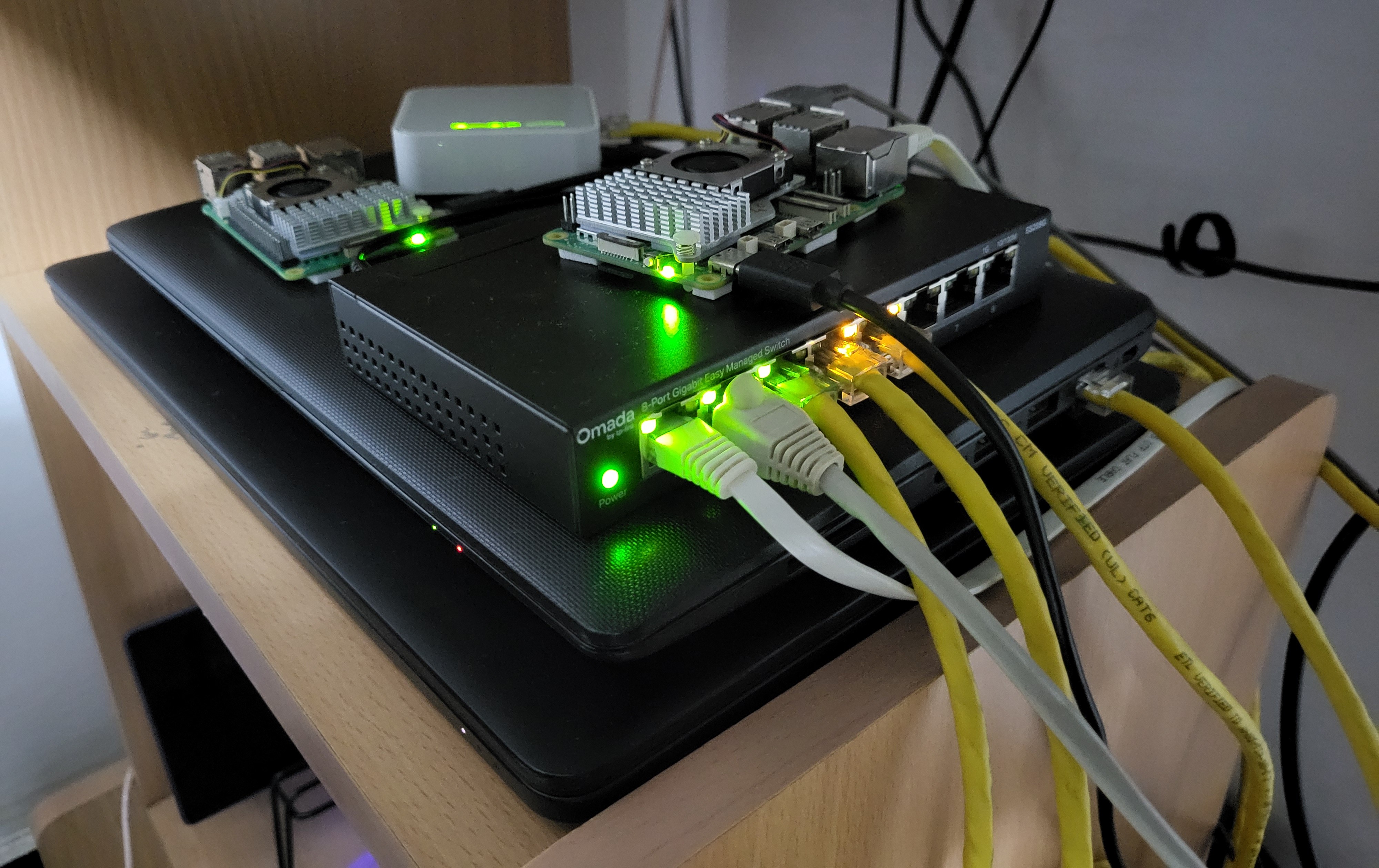
I first started homelabbing to solve one specific problem. The “copy over a movie, watch it, delete it” problem to be exact.
Since then, my homelab has grown significantly. So I wanted to show its current state and share my journey of building it.
If you have no idea what a homelab is, think of it as your own private mini data center. You can self-host services and experiment with infrastructure and software.
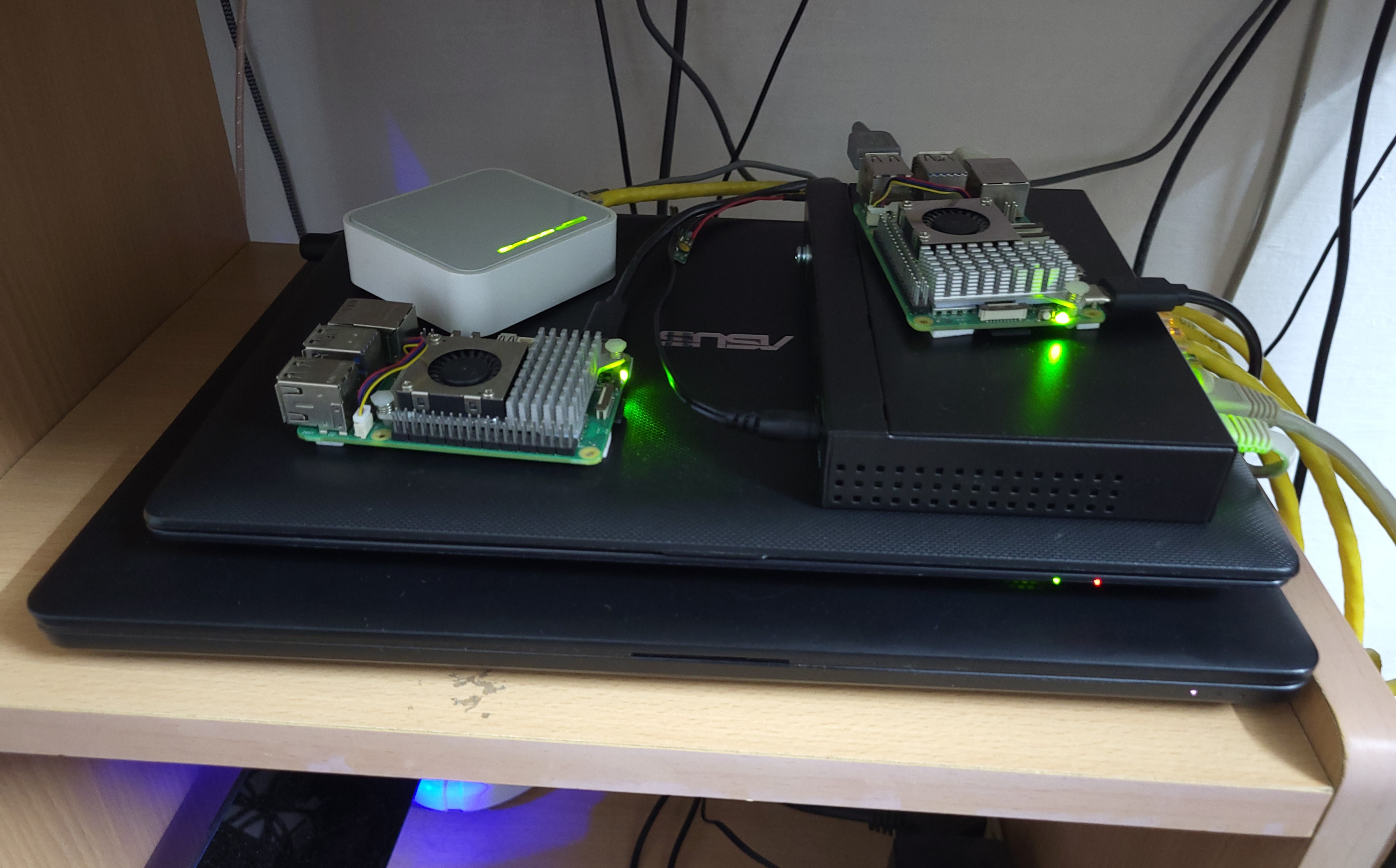
My homelab runs on two old laptops that are probably slower and weaker than the device you are reading this on. One of them is an Asus x200ca (12.5 years old) and the other is a Dell Latitude E5470 (10.5 years old). They both run Proxmox VE, a bare-metal hypervisor. It is like VirtualBox, but instead of being a program that runs on your computer, it is the OS itself. This allows me to run various VMs and containers on those machines, and I have quite an assortment running now.
Here is everything that I have running now:
- Media & Content Services
- Navidrome: Lets me self-host my music and stream them on all my devices. (personal Spotify)
- Jellyfin: Same concept as Navidrome but for movies and TV shows. It can do music too but it was troublesome for me.
- Automation & Agents
- n8n: It lets you automate almost anything and is one of my personal favourites.
- Firecrawl: A self-hosted web scraper that I use to extract data for my n8n workflows. I primarily use it to track stock and price drops for things I am planning on buying.
- Hermes: It is an AI agent that can do a lot of cool things for you. Similar to OpenClaw.
- Home Automation & IoT
- Home Assistant: An open-source smart home controller. I do not have any store bought smart home devices. I made my own smart home devices using ESP32s and connected them to Home Assistant using the ESPHome plugin.
- Networking & Access
- Cloudflare Tunnel: Gives me secure external access to internal services.
- Nginx Proxy Manager: Reverse proxy and internal routing
- Pi-Hole: DNS server and network level ad blocking
- Observability & Monitoring
- Prometheus: Metrics collection
- Grafana: Metrics visualization and dashboards
- Infrastructure Automation & Operations
- Ansible: Cluster-wide package updates and VM and LXC lifecycle management. I have it wired to my MacroDeck so I can turn on/off VMs/LXCs on demand.
- Container Orchestration
- Kubernetes (k3s): Deploying and orchestrating containers
- ArgoCD: GitOps based deployments. I have my ML models that me and my team made for various projects over the years deployed here.
And two more containers. The pxe container handles network booting so I can boot other computers and Raspberry Pis directly from the network. The website container hosts my website. I have since migrated it to a cloud provider to maintain better uptime.
The two laptops are configured as a cluster. This allows features like centralized management, high availability, seamless migration, Ceph and quorum. The feature that benefits me most is the centralized management feature. It allows me to manage both machines in a single dashboard.
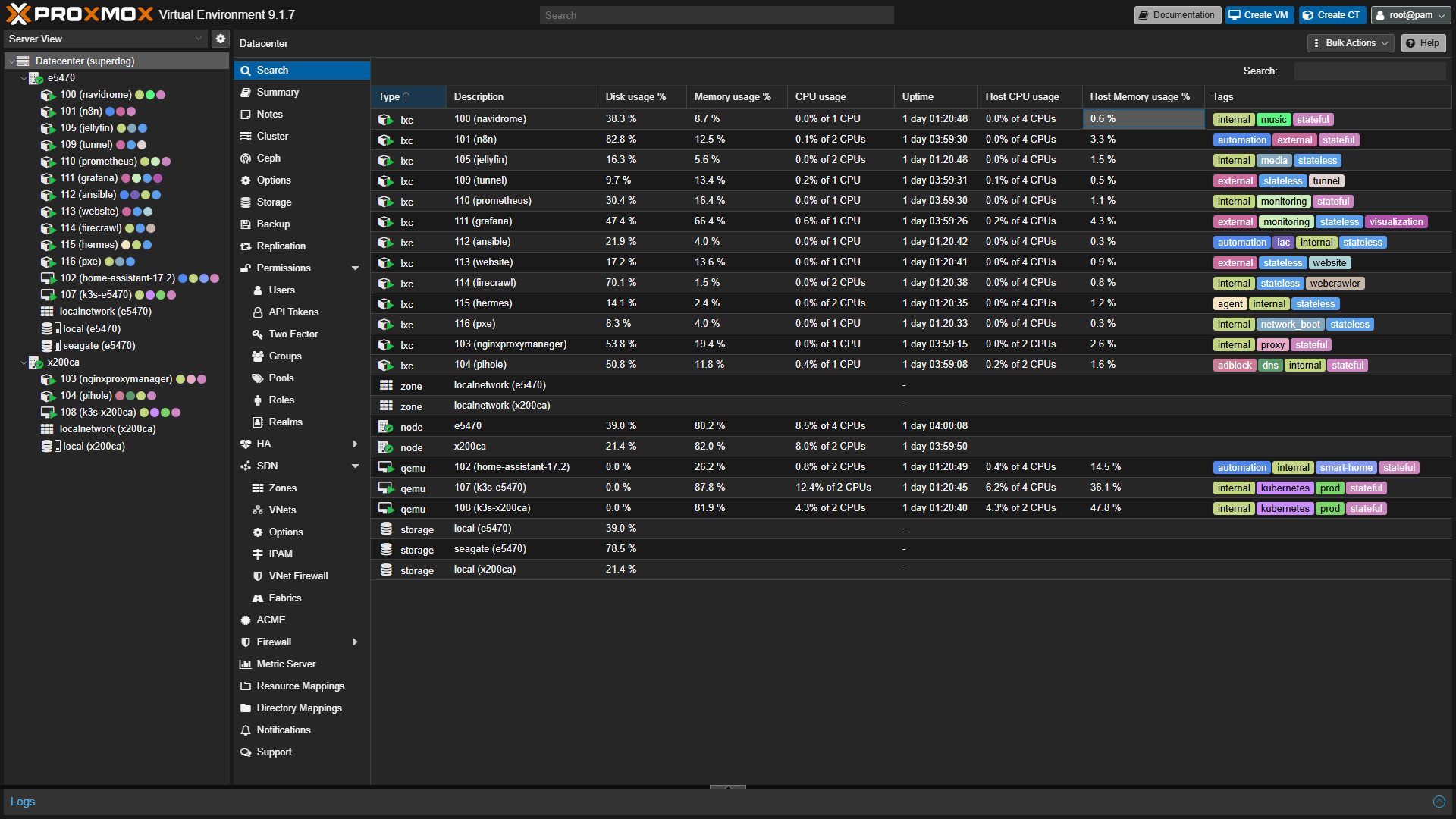
Managing them in one dashboard was great, but getting them on the same network was a completely different nightmare.
If you know anything about Proxmox, you know that it does not play well with Wi-Fi. It was designed primarily for server racks and headless infrastructure where they use ethernet cables because they are simple, fast, and reliable. Since I did not have a router or a switch that I could simply plug into the laptops, I had to improvise and make one myself.
I took a Raspberry Pi 5 that I had on hand and installed OpenWRT on it. Then I plugged it into a managed switch, and now I have my own homemade gigabit router!
And I had an old TP-Link Pocket router lying around which I hooked up as the AP. Now all devices but my phone will be on the same network making my life so much easier.
To understand how I reached this point, it helps to rewind to where it all started. I had to deal with numerous problems that I did not have the equipment to solve, forcing me to invent some interesting solutions. Here is the true story of how it all came together.
Whenever I wanted to watch one of my favorite movies (I rarely watch new ones, I just keep looping my favorites), I had to copy the movie from my hard drive over to the device I was going to use. Since my collection was entirely 1080p and 4K, I was stuck in an endless loop of copying, watching, and deleting because storing those massive files on my phone or tablet was just not practical. I started looking for a better way and stumbled across Jellyfin.
I took my x200ca, installed Ubuntu Server, set up Jellyfin, plugged in my HDD, and voilà! I had my own private streaming service.
Naturally, one thing led to another, and I discovered things like Navidrome, Pi-Hole, and all the typical homelab projects. At one point, I even built a NAS using Samba and a spare 500GB drive. It was painfully slow, but it worked. The x200ca only had a 100M ethernet port, and the Wi-Fi was incredibly sluggish. I eventually moved the Samba NAS to a Pi 5, connecting my primary Alienware laptop and the Pi directly via ethernet. I tweaked the IP addresses and gateway settings so the devices could communicate, but I eventually scrapped the NAS idea entirely because I simply did not need it.
As I continued exploring, I realized that the bare Ubuntu Server setup was limiting my ability to do even cooler things, so I decided to install Proxmox on the x200ca.
The concept of Proxmox was brilliant, and I absolutely had to try it. It was at this exact moment I faced my first major struggle. Proxmox requires an ethernet connection, and I did not have standard internet in my home. My only source of connectivity was my phone hotspot. To bypass this, I set up an old TP-Link router in WISP mode so it could connect to my phone wirelessly, allowing me to plug the LAN port directly into the x200ca. It worked, and I successfully completed the Proxmox installation.
After that, I connected my main laptop to the TP-Link and logged into the Proxmox dashboard. I quickly realized the x200ca was not going to be able to do much because of its RAM limitation. It only had about 3.5 GiB. I went into the BIOS, dropped the iGPU shared memory to 12M, and managed to squeeze out 3.71 GiB of usable memory. It was a slight improvement, but still nowhere near enough. I had anticipated some bottlenecks, but I did not expect it to be this restrictive. With that little memory, I could only run a handful of containers.
So, I pulled out the Dell e5470 and installed Proxmox on it. With 8 GiB of RAM, it was miles better than the x200ca. Right around this time, I discovered that you could link these machines together to create Proxmox clusters.
I was stoked and wanted to try clustering immediately, but I hit a massive networking wall. I needed to hardwire both laptops, and I did not have a router capable of doing that. My old TL MR3020 pocket router only had one RJ45 port, and my main laptop refused to connect to its wireless network anyway.
Then I remembered the trick of plugging an ethernet cable directly between two laptops and manually changing the IPs and gateways. I realized I could connect both Proxmox laptops directly to my workstation (one via a USB-C hub and the other via the built-in ethernet port). However, that meant they would not have internet access. I had to get creative. I bridged the two ethernet adapters and set up Windows Internet Connection Sharing from my wireless adapter. Finally, the Proxmox laptops had internet access, and my workstation was on the same LAN so I could manage them.
With this band-aid solution, I set up the cluster and started deploying VMs and containers. It was actually working. I finally had a Proxmox cluster.
But then I wanted to try Home Assistant, which introduced a huge problem. My IoT devices and the cluster could not exist on the same LAN, meaning they could not communicate with each other. Right then, only the three laptops could talk to each other.
The fact that the Windows connection sharing dropped half the time, forcing me to set up the network from scratch ten times a day, certainly did not help either. Getting a proper router became inevitable.
Initially, I planned to just hook up a switch to the pocket router and call it a day, but that would only cause more problems. That ancient pocket router was bottlenecked by 100M ethernet and 72M wireless speeds. Those are numbers from 14 years ago. I scrapped that idea without a second thought.
Instead, I decided to build a router myself using one of the Pi 5s I had on hand. I bought a managed enterprise switch because it offered cool features compared to a basic plug and play switch, plugged it into the Pi, and started building my network core.
I installed Raspberry Pi OS Lite on the Pi because the 5GHz band would not work properly on other operating systems. For about a week, I was manually writing my own routing tables and firewall rules. It was incredibly time-consuming and far from ideal. I wasted a lot of time trying to force the Pi to behave like a router until a thought hit me: what if I could just install OpenWRT on this?
OpenWRT is custom firmware meant to be flashed on routers to unlock powerful features, offering a ton of freedom because it is based on Linux. It was made initially for consumer routers, not general-purpose SBCs like the Raspberry Pi, but since it was open source, I figured someone must have ported it, right?
I checked the internet and, to my surprise, there was a build specifically for the Pi 5. Without wasting a single second, I pulled the SD card, flashed OpenWRT, and put it back in. Suddenly, all my problems were solved. I finally had a proper router and a legitimate network infrastructure. I now use my phone hotspot as the WAN and the old pocket router as an access point.
Sure, my phone is technically not on the LAN, but that does not bother me. I do not use it for anything except calls anyway, so it is no big deal.
Everything felt like paradise, except for one lingering hardware issue.
The Dell e5470 was built for enterprise customers, so it came with features like Wake on LAN and Power on AC. I never had to open the lid to press the power button. However, the x200ca lacked all of those features; it only had an RTC wake timer. To fix this, I had already soldered a physical switch directly to the motherboard, but that still required a manual button press. Being the hardware hacker that I am, I wired up and programmed an Arduino Uno to literally press the power button on my behalf. Whenever the Dell booted, the Arduino would automatically trigger the x200ca to turn on as well. I ultimately removed the setup because the Arduino clone I used was sketchy, and I did not want to risk shorting out both laptops.
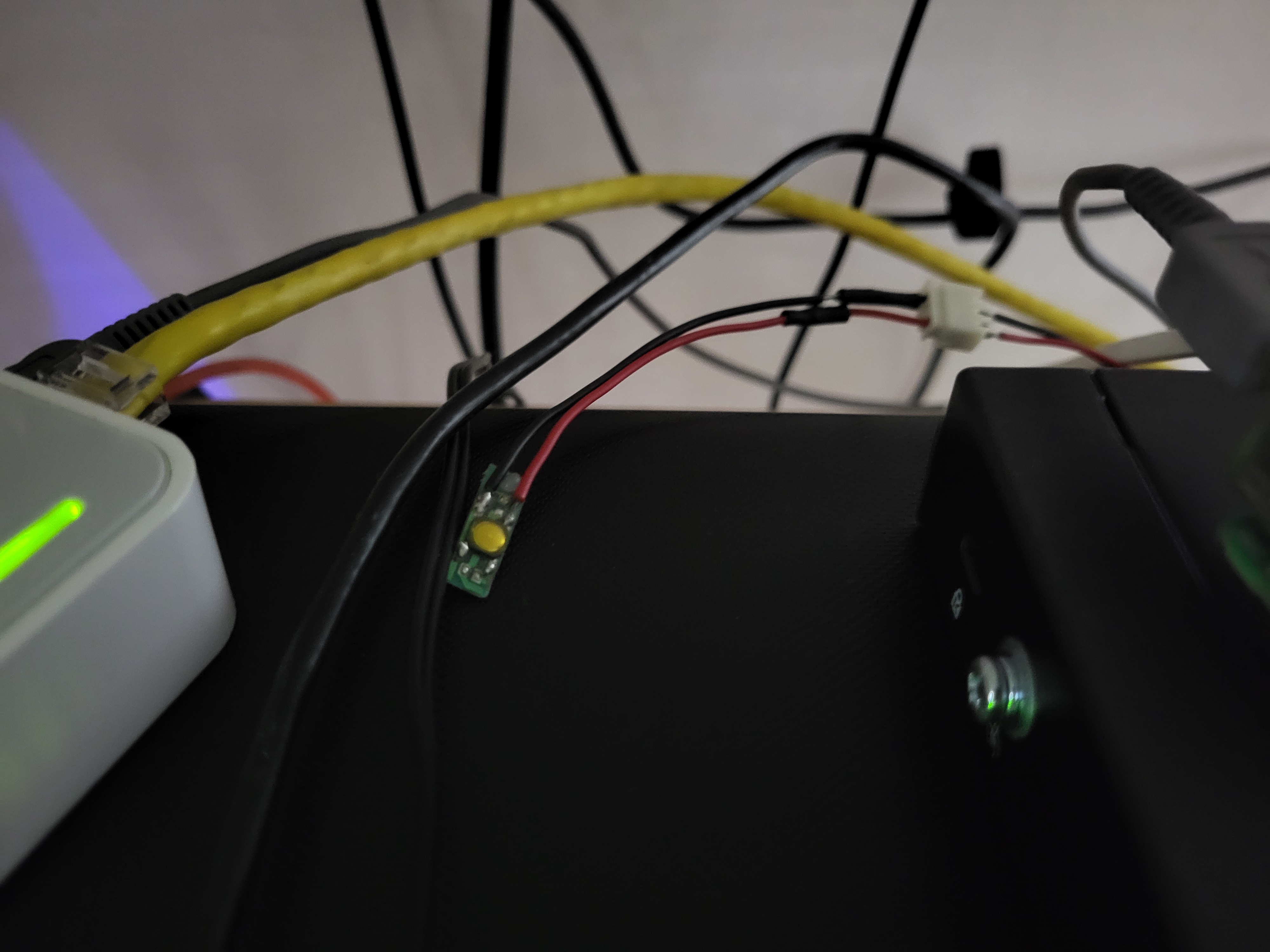
That brings us to today. I have a homemade router, a two node Proxmox cluster, and a GitOps pipeline running on salvaged hardware. What an incredible journey it has been. All those roadblocks and all those makeshift solutions just made it a wonderful rollercoaster.
If you have made it this far, Thank You so much for dedicating your time to read this. I really appreciate you being here. Thanks once again.